One customer, four names
The planning calls him “Fam. de Vries”, two rows down “de vries”, the email says “H.J. de Vries”, and the chat only mentions a street.
Van Dijk Installatietechniek has six engineers and around ten jobs a week. The planning lives in Excel, the appointments in the mailbox, the hours in a WhatsApp group and the materials on photos of till receipts. On Friday an invoice has to come out of that, and every week it costs the planner half a day of puzzling.
Van Dijk is a simulated engagement: a company we set up ourselves to build and test this workflow on.
 four-sources-into-one-process
The information you need to invoice sits in four places at Van Dijk. Each of them makes sense on its own: the planner works in Excel, customers send email, the engineers message each other all day, and receipts get photographed because that is the quickest way.
Margin leaks away without anyone seeing it: extra work that was done but never recorded, hours nobody can reconstruct, receipts that end up against the wrong job.
The real problem is not that there are four sources. It is that they contradict each other, and which one is right changes from case to case.
No disasters, just an ordinary week. But every one of these costs the planner time on Friday, and three of them cost money.
The planning calls him “Fam. de Vries”, two rows down “de vries”, the email says “H.J. de Vries”, and the chat only mentions a street.
The export contains “Bouwbedrijf Kroon BV” and “Bouwbedrijf Kroon B.V.” as separate rows. To a computer those are two different jobs.
The customer emails in the evening to move the appointment a day. The planning is never updated, so the receipt from that day fits nowhere.
An engineer reports hours after the fact, but adds something that points at today instead. Which day he means cannot be settled from the chat alone.
Subtotal plus VAT is not the total printed on it. Not fraud — just a digit the scan read wrong.
Approved in the chat, materials taken from own stock. Without the chat this disappears and nobody notices.
Nine jobs after deduplication, twelve AI calls. Five jobs could go straight to invoicing, three stayed open because no hours could be found anywhere, and one went to the review list.
“Bit more work than expected, the pipe ran behind the cupboard.” Address and job match, but the day contradicts the schedule and “2.5 hours I think” is an estimate. Nothing is booked, and the extra work is noted separately because nobody approved it.
“Yesterday after the butcher I dropped by the bakery. 40 minutes.” Yesterday is Thursday, but the butcher was Friday. The duration is clear, the day is not — so no day gets chosen.
€ 128.35 plus € 26.95 VAT is € 155.30, but the receipt says € 166.30. Not caught by the model but by the arithmetic step behind it. The model transcribes, code checks the sums.
Not a single receipt was linked to a job. All five usable receipts ended up on the list with two to four candidate jobs, so the materials total stayed at € 0.00 on every job. The workflow deliberately refuses to guess, but that meant no materials reached an invoice this week — and that was half the promise. The fix is not in the workflow but at the source: a job number on the receipt.
It is tempting to solve a process like this by handing everything to an AI model and hoping it is right. That works at ten jobs and breaks at two hundred. Four choices make the difference here.
A chat message carries no job number. Instead of handing the model the whole list, plain code first narrows it down by engineer and date. The model gets a handful of candidates and may not choose outside them. If it does anyway, the answer is discarded.
The model copies the amounts off a receipt, nothing more. The workflow then checks for itself whether the lines add up to the subtotal and whether the VAT is right. That is how the misread receipt surfaces on its own.
Working out hours goes to the strongest model, because a mistake there is a wrong invoice. Reading a receipt and sorting mail are simpler work and go to lighter models. Not the most expensive everywhere, and not the cheapest everywhere either.
When the workflow is unsure, it does not guess. It puts the case on a separate list together with the question a human needs to answer. That list is a proper outcome, not an error message.
The workflow runs in n8n on our own server. On the left the four sources, in the middle the step that normalises everything and strips out duplicates, then the split into the three AI steps, and on the right the four outcomes: weekly overview, billable, still open, and needs a human.
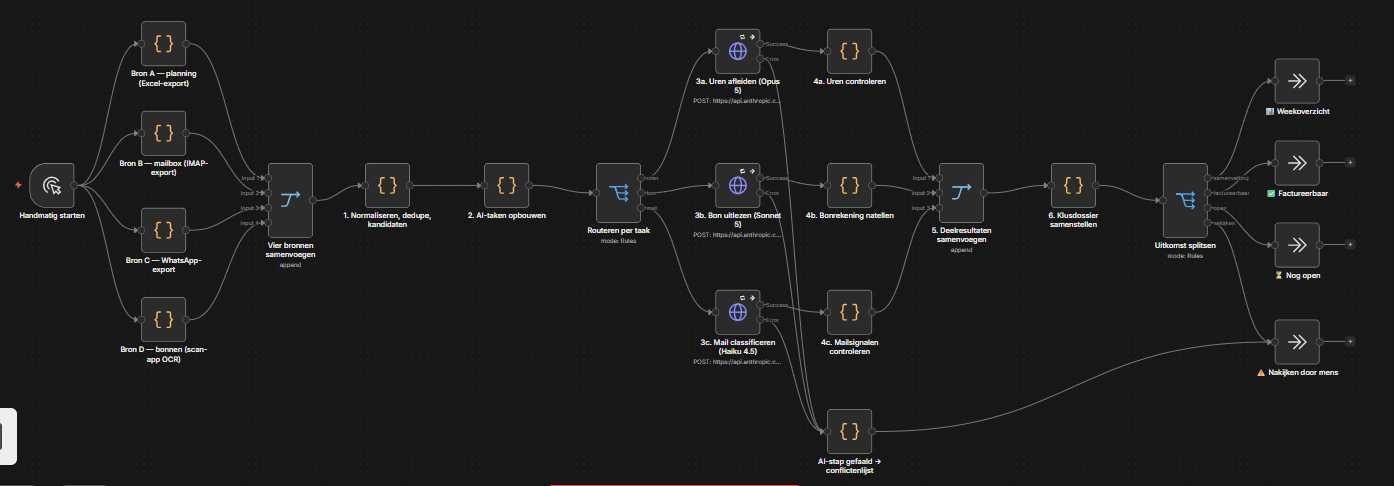
Success and Error. If an AI step fails, it takes the lower exit and that question lands visibly on the list, while the rest of the week carries on as normal.
Straight after every AI step sits a check written in code. It verifies the answer before it counts for anything.
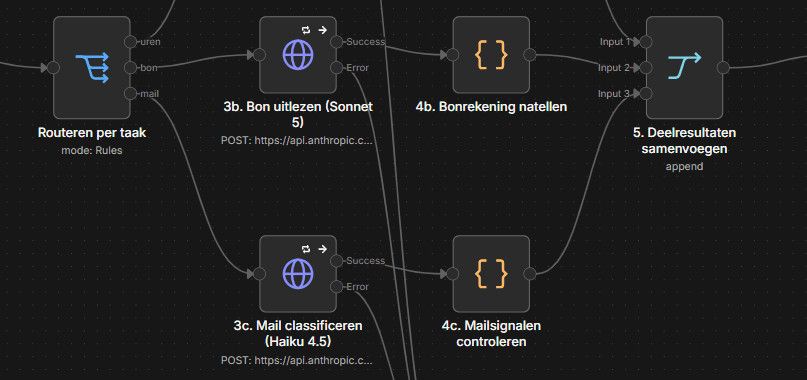
A half-processed week is more dangerous than a week that was not processed at all, because you cannot see the difference on the invoice. So every step has an exit for when things go wrong.
If an AI step fails because of an outage, it retries three times. If it still fails, that one sub-question lands visibly on the list and the rest of the week is finished as normal.
If the model returns a job number that was not in the candidate list, the assignment is thrown out.
Without a literal chat line as evidence, the hours are not booked.
If a receipt does not add up, it is neither corrected nor dropped — it goes to a human.
If a receipt photo is unreadable, the outcome is a request for a new photo, not a guessed amount.
During testing the connection to the AI model dropped and all twelve steps failed at once. The workflow did not crash: it finished cleanly, with all twelve questions visibly on the list and the reason attached.
That is exactly the behaviour you want on a Friday afternoon. Not because it was planned that way, but because it was built that way.