Curious where AI saves your business time?
The AI scan.
for Veenstra Installations
Where AI can support you
01Sorting the mailbox + draft replies
± 8 hrs/wk
02Draft quotes from a voice memo
± 6 hrs/wk
03Invoice checks before sending
± 5 hrs/wk
together ± 19 hours a week saved
1 / 14 Free
FreeThe scan
We read up on your business, look at how it works and work out what each opportunity is worth. We go through the report together, in plain language.
The build
You choose which opportunities we take on. We build the AI workflows that take that work over, inside the software you already use, and send you a quote for it first.

The care
Whatever is running, we keep running. We improve it where that pays off, and you look over our shoulder whenever you want.
What we actually deliver.
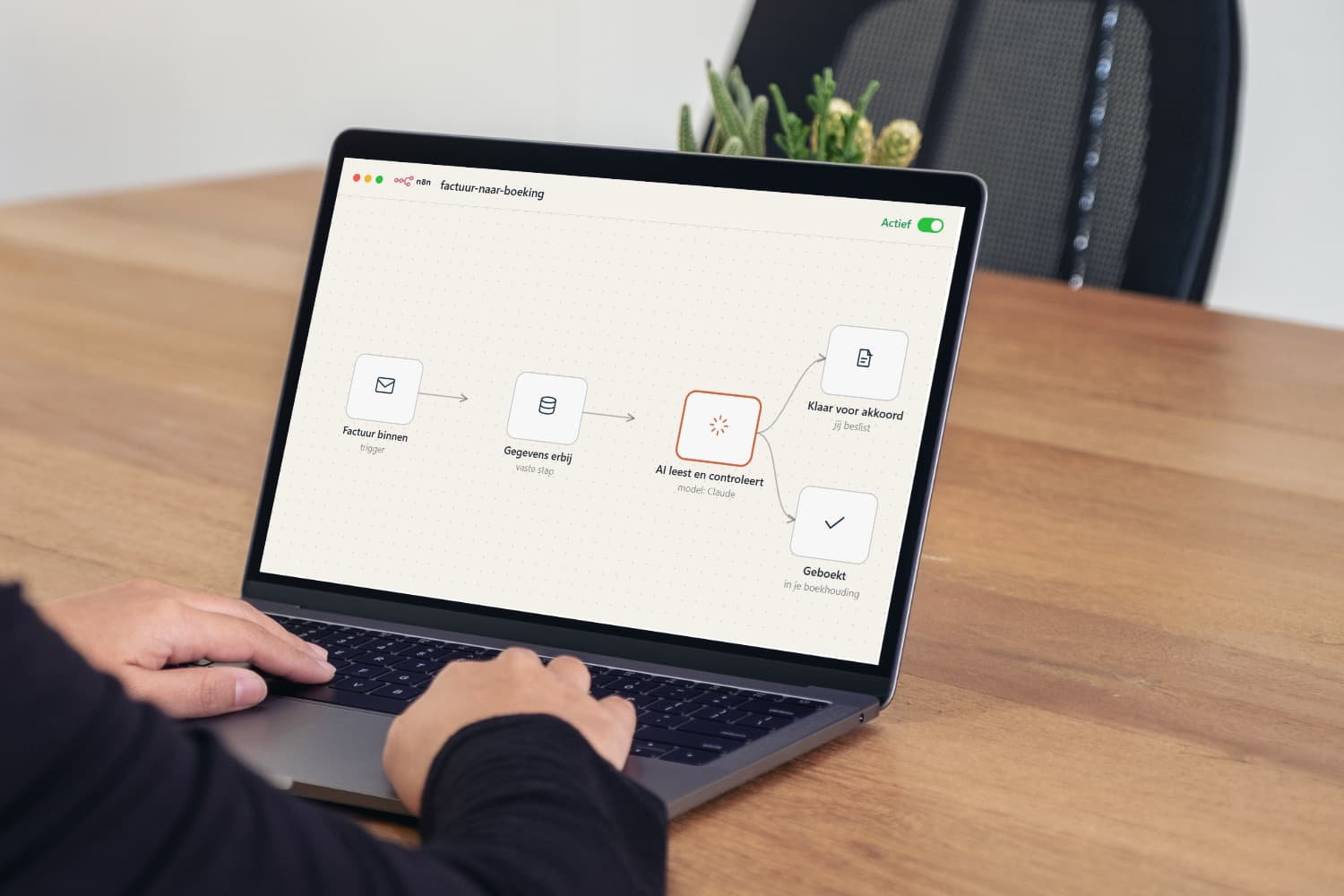
After the report we look together at which opportunities we take on. Those we build as workflows: fixed chains of steps that run by themselves as soon as work comes in. Next to this you can watch one run, from incoming invoice to booking.

A workflow, live
running
 Opus 5.0 · capable AI model
The chain runs by itself as soon as the trigger fires.
One brain for your processes.

Every business has work that repeats: retyping quotes, checking invoices, the same figures every week. Procesbrein is built to find exactly that work. We work out what AI can take over and build it into the software you already have.
And we would rather promise too little than too much. We keep estimates on the low side, and if AI is not going to help somewhere, that goes in the report too. We treat your data confidentially, under a data processing agreement.
And you speak to the person who does the research and builds it. No account managers, no layers in between. That keeps it personal and quick.
From practice: Veka Media.
At this web agency every project came with a lot of customer contact: briefings, feedback rounds, emails and phone calls. That information sat spread across mailboxes and loose notes, and had to be pieced together again with every question.
We built three workflows that keep track of it. Customer email still comes in as usual and the team reads and answers it themselves; in the background AI keeps the customer file up to date, so wishes, feedback and agreements sit in one place per customer. For a running project you can see at a glance what was agreed, without searching.
The AI runs entirely in house. Customer data goes nowhere: everything stays inside their own systems and no message goes to a customer through AI.
- less digging around per week
- 6 hours
- workflows running there today
- 3

“Easy contact with Finn, he quickly understood how our business fits together. The report was more concrete than we expected and we now have three workflows running. If something comes up, it is often sorted the same day. Recommended.”

How it works.
- 1
You request the scan
Leave your email address, that is all you need.
- 2
We get in touch as soon as we can
We hear how your business works and what you want to achieve, and we agree which documents help with that.
- 3
You send documents, we do the research
You send what we agreed on. The more you share, the sharper the report.
- 4
You get the report and we go through it together
After that you decide whether we build anything. If you would rather not, that is where it stops.
Questions we hear a lot.
Is your question not here? Go to the contact page or message us on WhatsApp.
What exactly are AI workflows?
Fixed chains of steps that run by themselves as soon as work comes in. Think of a purchase invoice that gets read and checked the moment it lands in the mailbox, or customer email that is summed up in the customer file automatically. We build them inside the software you already use, and at every step that goes out the door a person stays in control. On AI workflows explained we show step by step how something like that works.
Am I committing to anything?
No. The scan stands on its own and you are not tied to anything. After the report you decide whether we build something for you; if you would rather not, that is where it stops. There is no subscription, no small print and no obligation to buy anything. The report is and stays yours.
What if AI does not work for my business?
Then that is what the report says. We would rather promise too little than too much: if AI is not going to help somewhere, we write that down, and what is not worth doing goes in there just as clearly. That way you also know what not to start on, and it has cost you nothing. Although the honest answer is also: so far that has not happened. In every business we looked at there was repetitive work somewhere where AI can save time.
What do I need to send over?
We agree that in the first call, and it depends on your processes. Usually it is a few example documents: a quote the way you make it now, an export from your mailbox or bookkeeping, or simply a description of what a normal working week looks like. You do not have to prepare anything in advance and you do not have to install anything. The more you share, the sharper the report gets, but even with a limited picture we can already say a lot about where time can be saved.
How much of my time does it take?
For you it comes down to one conversation and sending over some documents; all together usually no more than a few hours of your own time. We do the research itself. You do not have to install anything, set anything up or free up anyone on your team. Once the report is ready we go through it together and you can ask us anything.
Is my data safe?
Yes. We treat your documents confidentially, under a data processing agreement. We only use them for the research, do not share them with anyone else and keep nothing longer than that requires. Your data is also not used to train AI models. If you want to know exactly how we handle data, you can read that in our privacy statement.
Request the free scan.
Leave your email address and we get in touch as soon as we can to start the scan. Any questions or doubts we simply cover in that call.
Have a different question? Go to the contact page or message us on WhatsApp.